


How to Set Up Smart Links: Route by Country, Device, or Browser (2026)
Imagine someone taps your link in bio to download your app on an Android and gets sent to the App Store.
Or someone from Italy wants to buy your product, but they get sent to your US online shop that has different availability than your Italian one.
You will get no error message or bounce rate data, because people just leave.
Adding one smart link rule to direct your visitors to a link that matches them on country, operating system or browser can take a minute. You can also learn more about what a smart link is.
Deciding which rules you need, what order they sit in, and which rule sometimes "overpowers" others is the fun part. Spoiler alert: It does take a little longer.
So here it is. Three finished setups of smart rules with Linkie,with the reasoning attached, and the three ways they fall apart.
Setup | The problem it solves | Rules | Solution |
|---|---|---|---|
You launched an app. (congrats btw) | One link for two different app stores? What if an Android user opens the App Store? | 2 operating system rules (iOS or Android) | A page about the app that matches their operating system |
Shopping internationally | Customers reaching a store that can't serve them. A customer from Italy should land on the Italian page, to match the Italian stock and offers. Most likely on a website that ends with ".it". A customer from the US should land on the US website. Same for someone shopping from Brazil. | 3 country rules, USA, Italy & Brazil. | They get re-routed to the correct store that matches their location. |
Creator on five platforms | One bio link, several audiences | 1 country rule, 2 operating system rules | Sometimes, your rules can get more complex. You might want a different destination for someone in the US who uses an iPhone and is on Firefox, or 5 other combinations like that, running at the same time. Good news, Linkie Plus offers unlimited rules. All your smart rules can co-exist inside Linkie Plus, while the one you put on the top wins against a rule at the bottom if they match. |
A 30 second recap:
A smart link is a link that opens different links depending on who clicks it. Rules check where they click from (country), what they're using (operating system) or browser. If no rules apply they open the original link.
If 2 rules overlap the one you scroll to the top wins.
Setup 1: promoting an app
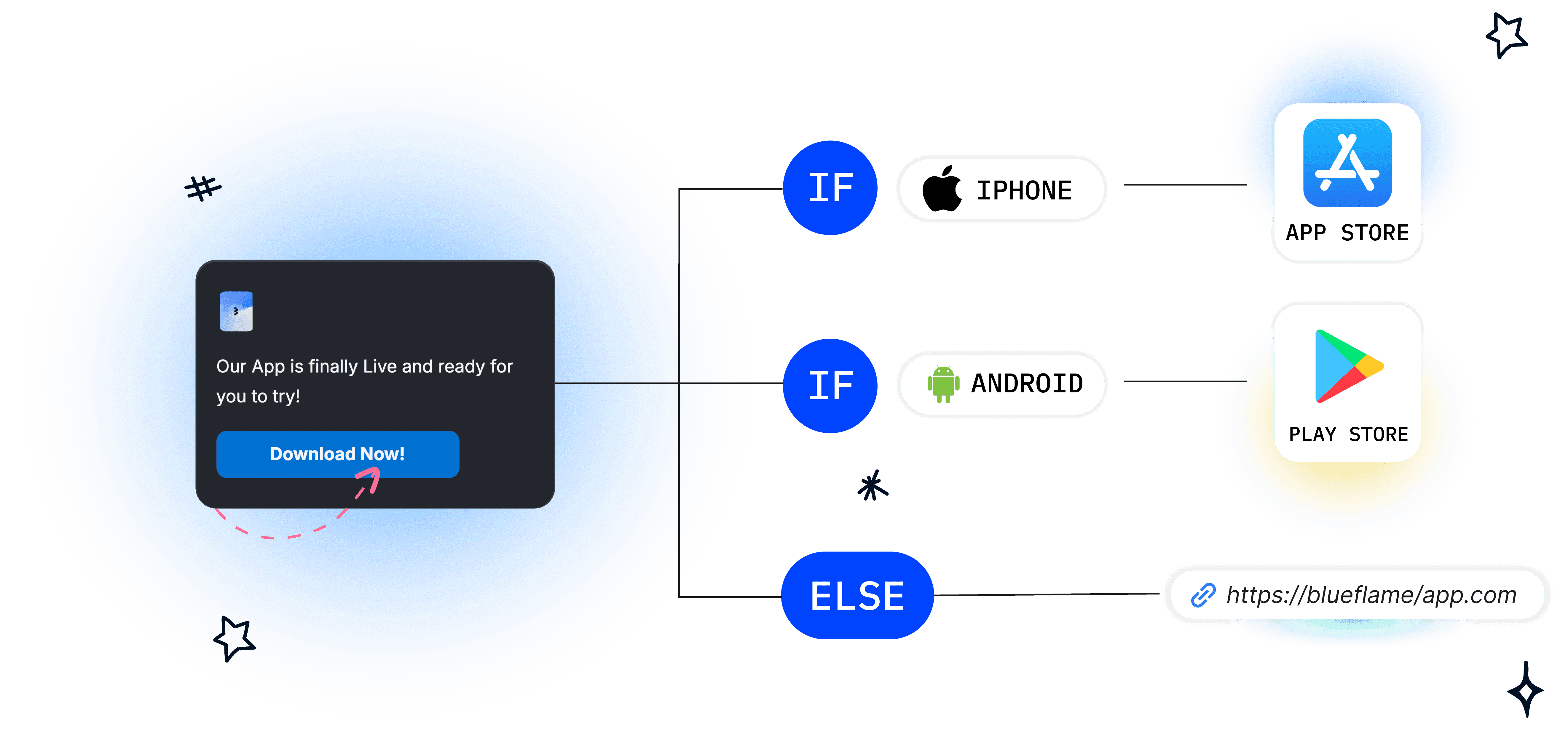
You've got an app on both stores (App Store & Play Store) and one profile link for your socials, website, email, etc.
This is where you add a smart rule when people click the "download app" button:
(IF) Operating system is iOS, they get matched with the App Store listing
(IF) Operating system is Android, they get matched with the Google Play listing
This way, you don't lose customers when focusing on promoting the app.
If the ones who click are neither, you can set a default destination, like a landing page for the app.
Setup 2: the online shop that cannot ship everywhere
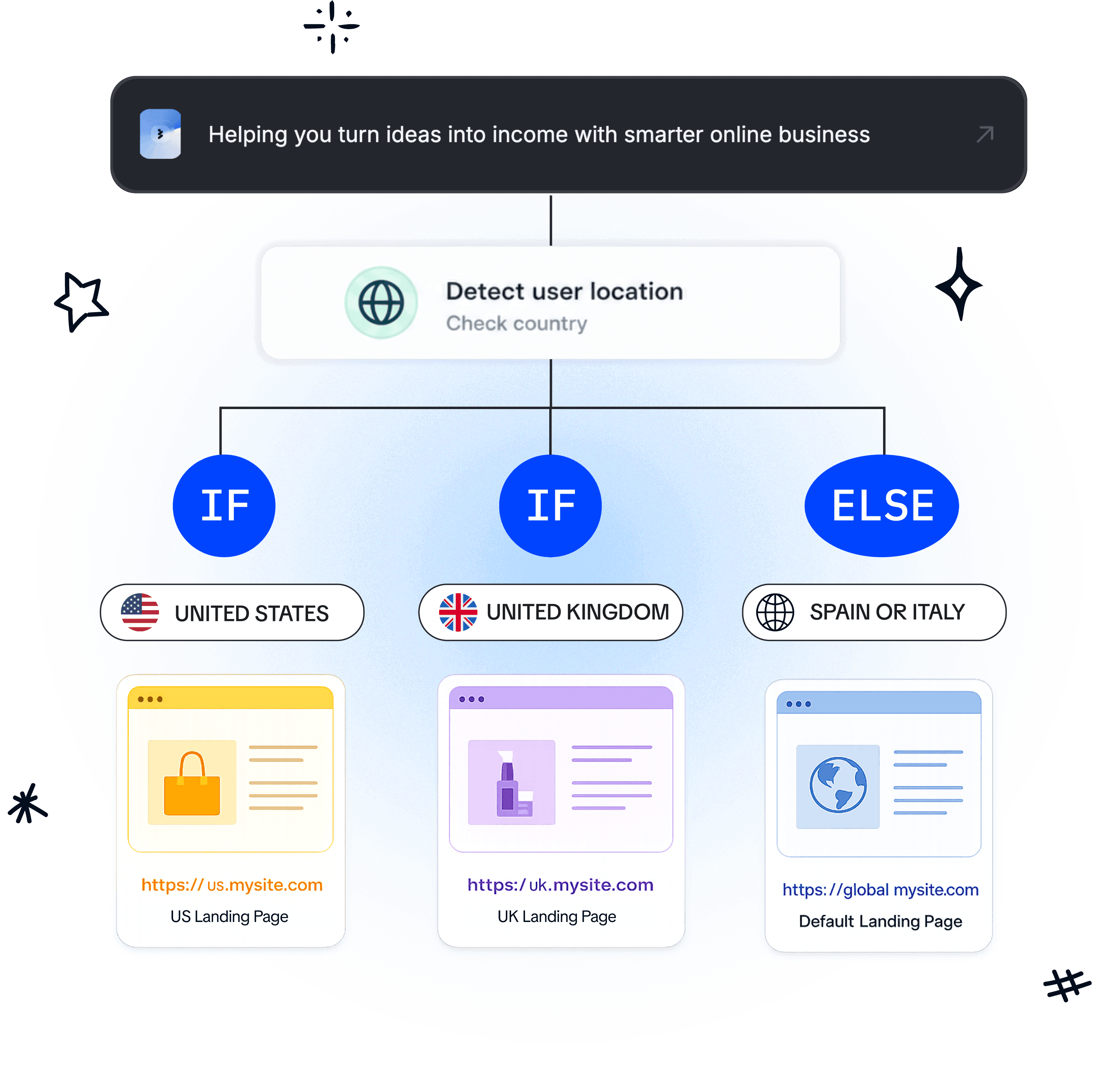
Let's say you're selling in three regions and you have three online stores.
Sending someone to the wrong one is something they might find at checkout, after they've chosen sizes or even typed their address.
This is where smart link rules come in useful again: In this case the variable is the country.
Example: If the country is United States, they get sent to the (.com) store.
If the country is Italy, they get sent to the (.it) store. Same logic for the UK.
Different countries can mean different stock, sizes, offers, shipping, etc.
That's why smart links are important.
Setup 3: one link in bio across different platforms
You have the same link in your Instagram profile, TikTok, YouTube description, the newsletter footer, an email signature.
These are all different "doors" with different audiences.
This is where your knowledge about your audience becomes crucially important. So for example, if you know that most of your audience from Germany is interested in an app you have, but let's say your US audience is interested in your newsletter, all the complexity can be written with the smart link targeting rules. And over here, there might be cases where rules overlap each other.
This is where knowing how smart rule priority works becomes useful.
It's simple, the rule you drag to the top wins.
You want to think of your rules as people, an American on an iPhone, a German browsing on Android. This way you can understand better how to place rules and which one wins.
Three mistakes that break link routing
Mistake 1: no default destination.
You need a default destination, so that when no rules match, the user can still go to the default link.
Mistake 2: general rules above specific ones
If the rule on top is wider than the rule below, it will usually bury it. If your audience is mostly US and you have two rules, one about location and one about iOS, you might want to put the narrower rule on top, otherwise, it might never be applied since most of the people are from the US regardless.
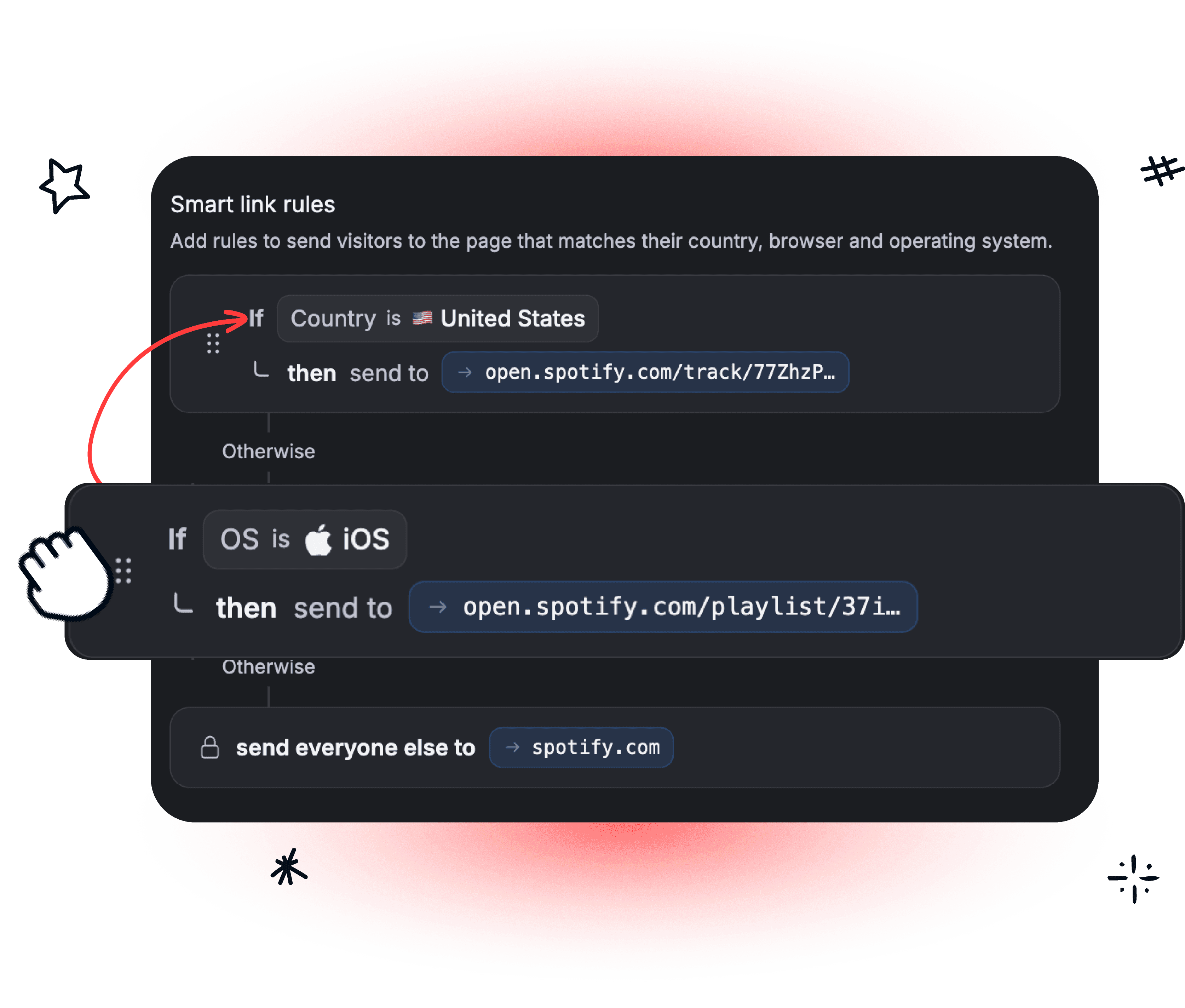
Read your list to yourself as people.
American on an iPhone. German on Android. Canadian on a laptop. Someone in São Paulo on a two-year-old phone.
Reading your rules back as four people takes two minutes and catches nearly everything.
Mistake 3: tested from one desk, on one device
Smart Links can be full of surprises; that's why you should test first.
Try one yourself, ask a friend from a different country or a different system, just to see if there aren't any surprises before you launch it into the world.
The great news about Linkie is that Linkie Plus offers an unlimited number of smart rules for you to test out.
Common questions
How many rules should one link have?
Linkie.bio offers unlimited smart rules, but we would recommend using as few as do the job. Each one is another route to test and another chance for two rules to argue.
What happens if a visitor matches two rules?
The higher one wins. You can drag rules up and down to set priority through Linkie.
What if someone matches no rule at all?
If no rules apply, visitors get sent to the default link.
Does a VPN break country rules?
Linkie smart links re-routes visitors based on IP.
Can I change a destination after sharing the link?
Yes. Same URL. Everything already posted or printed keeps working.
Create your first smart link
Just choose a setup you'd like to test and start using a smart link so you don't lose any more clicks.
Smart links are part of Linkie Plus.